






If you’ve spent any time researching website security, you’ve almost certainly come across the term ‘Web Application Firewall’ — or WAF. It tends to sound technical and enterprise-grade, the kind of thing big corporations worry about, not small business website owners.
That assumption is wrong — and it’s one that leaves thousands of websites unnecessarily exposed every day.
In this guide, we’ll explain exactly what a WAF is in plain English, how it works, what it protects against, and whether your website actually needs one. Spoiler: it almost certainly does.
What Is a Web Application Firewall?
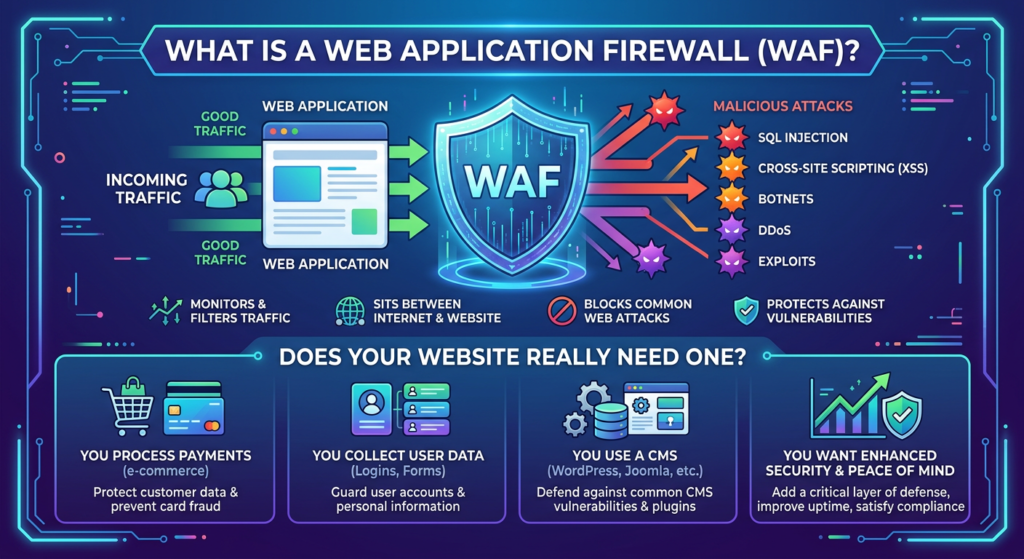
A Web Application Firewall (WAF) is a security layer that sits between your website and the internet, inspecting all incoming traffic and filtering out malicious requests before they reach your server.
Think of it as a highly intelligent bouncer at the door of your website. Every visitor, bot, and request that tries to access your site passes through the WAF first. The WAF checks each request against a set of security rules — and anything that looks malicious gets blocked before it can do any damage.
Unlike a traditional network firewall (which operates at the network level and controls which connections are allowed), a WAF operates at the application layer — meaning it understands the content of web requests, not just where they’re coming from. This is crucial, because most modern web attacks are disguised as legitimate HTTP traffic.
What Does a WAF Actually Block?
A properly configured WAF defends against a wide range of attacks that would otherwise reach your website:
- SQL Injection: Attempts to manipulate your database by injecting malicious SQL commands through input fields
- Cross-Site Scripting (XSS): Malicious scripts injected into your web pages to attack visitors
- Brute Force Attacks: Automated attempts to guess admin passwords through repeated login attempts
- DDoS Attacks: Floods of fake traffic designed to overwhelm and take down your server
- Zero-Day Exploits: Virtual patching protects against newly discovered vulnerabilities before official patches are available
- Bad Bot Traffic: Malicious scrapers, spam bots, and vulnerability scanners consuming your server resources
- File Inclusion Attacks: Attempts to include malicious files through vulnerable upload or include functions
How Does a WAF Work?
WAFs use several techniques to identify and block malicious traffic:
- Signature-based detection: Matches requests against a database of known attack patterns — like antivirus for web traffic
- Anomaly detection: Identifies requests that deviate significantly from normal patterns, even if they don’t match known signatures
- IP reputation: Blocks requests from IP addresses known to be associated with malicious activity
- Rate limiting: Restricts the number of requests from a single source, blocking brute force and DDoS attempts
- Virtual patching: Applies temporary protection against known vulnerabilities in your CMS or plugins while you wait for official updates
Types of WAF: Which One Is Right for You?
Network-Based WAF
Hardware appliances installed on-premises, typically used by large enterprises. Extremely fast, but expensive and complex to manage — not practical for most website owners.
Host-Based WAF
Software installed directly on your server or as a plugin within your CMS. More flexible than hardware, but uses your own server’s resources and requires technical configuration.
Cloud-Based WAF
Traffic is routed through a third-party cloud network that filters it before passing clean traffic to your server. No hardware, no complex setup, and the filtering happens before requests reach your server at all. This is the most practical option for the vast majority of website owners.
Sucuri’s WAF is cloud-based — meaning it works at the DNS level, routing your traffic through Sucuri’s global network. Setup involves a simple DNS change, it works with any hosting provider and any CMS, and your server only ever receives clean, filtered traffic.
With and Without a WAF: Side by Side
Attack Type | Without WAF | With Sucuri WAF |
SQL Injection | ❌ Reaches your database | ✅ Blocked at the edge |
XSS Attack | ❌ Injected into your pages | ✅ Filtered before delivery |
Brute Force Login | ❌ Unlimited attempts allowed | ✅ Rate-limited & blocked |
DDoS Flood | ❌ Server overwhelmed | ✅ Absorbed by global network |
Zero-Day Exploits | ❌ No defence until patched | ✅ Virtual patching applied |
Bad Bot Traffic | ❌ Consumes server resources | ✅ Identified & blocked |
Does My Website Really Need a WAF?
Let’s address this directly. You need a WAF if:
- Your website generates revenue — any downtime or compromise directly costs you money
- You collect any personal data — emails, names, addresses, payment information
- You run WordPress or any other CMS with plugins — plugin vulnerabilities are the top attack vector
- You rely on organic search traffic — a blacklisting event from malware can devastate your rankings
- You want to sleep without worrying about your website — a WAF provides genuine peace of mind
The honest answer is: if you have a website worth protecting, you need a WAF. The cost of a WAF is a fraction of the cost of recovering from a single serious attack.
What About Free WAF Options?
Free WAF options like Cloudflare’s free plan offer some basic protection and are better than nothing. However, free tiers typically provide limited rule sets, no virtual patching, and minimal support. For business websites, eCommerce stores, or any site where security genuinely matters, a dedicated security WAF provides significantly more comprehensive protection.
Sucuri’s WAF is purpose-built for website security — not a general-purpose CDN with security features bolted on. It includes continuously updated rulesets, virtual patching for CMS vulnerabilities, DDoS mitigation, and integration with Sucuri’s broader security platform including malware scanning and guaranteed cleanup.
🔥 Every website faces attacks — most owners just don’t see them happening. Add a WAF to your website with Sucuri and block attacks before they ever reach your server.
A WAF doesn’t just protect your website. It gives you the freedom to focus on growing your business instead of worrying about who’s trying to break into it.