

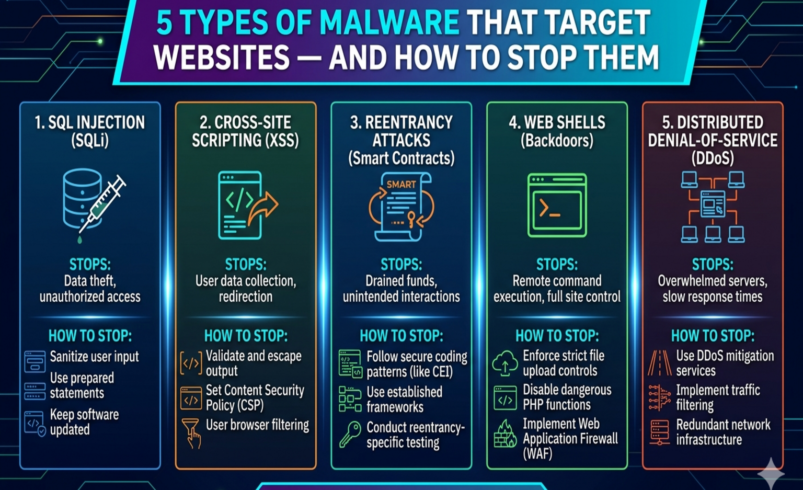

Malware isn’t just something that happens to desktop computers. Websites are one of the most common targets for malicious software — and the variety of attack types is growing more sophisticated every year.
Understanding the specific types of malware that target websites helps you make smarter security decisions and know exactly what you’re protecting against. Here’s a plain-English breakdown of the five most common website malware types, how they work, how to detect them, and most importantly — how to stop them.
1. SQL Injection (SQLi)
What It Is
SQL injection is one of the oldest and most prevalent web attack types — and it’s still responsible for a huge proportion of website breaches. It works by inserting malicious SQL commands into input fields (contact forms, search boxes, login fields) that aren’t properly secured, tricking your database into executing unauthorized commands.
What Hackers Can Do With It
- Extract your entire database — including usernames, passwords, emails, and customer data
- Delete or modify database content
- Bypass login authentication entirely
- Insert spam content or malicious redirects directly into your database
How to Detect It
SQL injection is rarely visible to site owners until significant damage is done. Signs include unusual database errors, unexpected content appearing on your site, or new admin users you didn’t create. Regular database scanning is the only reliable way to catch it early.
How to Stop It
- Use a Web Application Firewall (WAF) that inspects and filters SQL injection attempts in real time
- Ensure all database queries in your code use prepared statements and parameterized inputs
- Keep your CMS, plugins, and themes updated — SQL vulnerabilities are frequently patched in updates
- Run regular database integrity scans
2. Cross-Site Scripting (XSS)
What It Is
Cross-site scripting attacks inject malicious JavaScript into your web pages — code that then executes in your visitors’ browsers when they load the page. Unlike SQL injection which targets your database, XSS targets your users.
What Hackers Can Do With It
- Steal session cookies to hijack user accounts
- Redirect visitors to phishing sites or malicious downloads
- Display fake content or forms to harvest login credentials
- Install drive-by malware on visitors’ devices
How to Detect It
XSS injections are often invisible to the naked eye — they’re hidden in page source code. You might notice visitors reporting strange behavior, unexpected redirects, or your site showing content you didn’t add. A malware scanner that checks page output is essential.
How to Stop It
- A WAF that detects and blocks XSS payloads in incoming requests
- Implement a Content Security Policy (CSP) header to restrict which scripts can run on your pages
- Ensure your CMS and plugins encode output correctly so user-generated content can’t inject scripts
- Regular malware scanning of page content and files
3. Drive-By Downloads
What It Is
A drive-by download happens when a visitor to your website has malware automatically downloaded and installed on their device — without clicking anything or giving any permission. It exploits vulnerabilities in browsers, browser plugins (like outdated PDF readers), or operating systems.
From your visitors’ perspective, they simply browsed your website and their computer got infected. From your perspective, your legitimate website became an unwitting malware distributor — with devastating consequences for your reputation.
What Hackers Can Do With It
- Install ransomware, spyware, or keyloggers on your visitors’ devices
- Turn visitors’ computers into part of a botnet
- Steal personal information from infected devices
How to Detect It
Drive-by download scripts are injected into your website files or database. Google’s Safe Browsing will eventually detect and flag your site — but by then, many visitors have already been affected. Proactive malware scanning catches these injections before Google does.
How to Stop It
- Continuous malware scanning of website files and database content
- A WAF that identifies and blocks known malicious script patterns
- Keeping your CMS, themes, and plugins updated to close vulnerabilities exploited by injection attacks
- File integrity monitoring that alerts you to unauthorized file changes
4. SEO Spam (Keyword Hack / Japanese SEO Hack)
What It Is
SEO spam — sometimes called the keyword hack or Japanese SEO hack — is one of the most common and least immediately obvious forms of website malware. Hackers inject thousands of hidden spam pages into your website, stuffed with keywords for pharmaceuticals, counterfeit goods, or foreign-language spam content.
These pages are invisible to you (the site owner) and invisible to regular visitors — but search engine crawlers see them and index them. The result: hackers hijack your domain’s authority to rank their spam content in search results.
What Hackers Can Do With It
- Rank thousands of spam pages under your domain without your knowledge
- Eventually get your site penalized or de-indexed by Google when the spam is detected
- Use your domain’s reputation to drive traffic to scam or pharmaceutical sites
How to Detect It
Google your site using site:yourdomain.com and look through the results. If you see pages in foreign languages, or titles referencing products you don’t sell, you’ve almost certainly been hit. Google Search Console’s Coverage report may also show thousands of unexpected indexed pages.
How to Stop It
- Regular malware scanning that checks for newly created or modified files and database entries
- File integrity monitoring to detect unauthorized additions
- A WAF to block the initial intrusion attempts that allow spam injection
- Monitor Google Search Console regularly for unexpected indexed pages
5. Backdoor Shells
What It Is
A backdoor shell is a hidden file — usually a PHP script — that hackers upload to your server to give themselves persistent, ongoing access to your website. Think of it as a secret door that remains open even after you’ve changed your passwords and cleaned up other malware.
Backdoors are frequently the reason hacked sites get reinfected. An owner cleans the visible malware, changes their passwords, updates their plugins — and two days later, the site is infected again. The backdoor was never found.
What Hackers Can Do With It
- Execute any command on your server remotely
- Upload new malware at any time
- Access, modify, or delete any file on your hosting account
- Use your server to send spam, host phishing pages, or attack other websites
How to Detect It
Backdoor files are specifically designed to evade detection. They’re often disguised as legitimate system files, placed in unexpected locations (like the uploads folder), and contain heavily obfuscated code. Standard visual inspection almost never finds them — you need a security scanner designed to identify obfuscated PHP scripts and anomalous file placements.
How to Stop It
- Use a malware scanner that specifically checks for obfuscated PHP and known backdoor patterns
- File integrity monitoring that alerts you to new or modified files
- Restrict file permissions so the web server can’t write PHP files to non-designated directories
- After any hack, use a professional malware removal service that specifically hunts for backdoors — not just surface malware
Quick Reference: Website Malware at a Glance
Malware Type | What It Does | How to Stop It |
SQL Injection | Extracts or corrupts your database by inserting malicious SQL commands | WAF, input validation, prepared statements |
Cross-Site Scripting (XSS) | Injects malicious scripts into pages viewed by your visitors | WAF, output encoding, Content Security Policy |
Drive-By Downloads | Silently downloads malware onto visitors’ devices | Malware scanning, WAF, keep CMS updated |
SEO Spam / Keyword Hack | Injects hidden spam pages to hijack your search rankings | File integrity monitoring, malware scanning |
Backdoor Shells | Gives hackers persistent hidden access to your server | File monitoring, malware removal, harden permissions |
The Common Thread: How All of These Are Stopped
Looking across all five malware types, a clear pattern emerges. Effective protection requires three things working together:
- Prevention: A Web Application Firewall that blocks attack attempts before they reach your site
- Detection: Continuous malware scanning and file integrity monitoring that catches infections early
- Response: Professional malware removal that finds and eliminates every trace — including backdoors
Sucuri is built around exactly this three-layer model. Its cloud-based WAF blocks attacks at the perimeter, continuous scanning monitors your site 24/7 for all of the malware types covered above, and its security analyst team handles professional cleanup with a guarantee — including thorough backdoor hunting — when anything gets through.
Whether you’re running a WordPress blog, an eCommerce store, or a business website, these five malware types represent the most likely threats you’ll face. The good news is that a single, well-configured security platform addresses all of them.
🛡️ Don’t leave your website exposed to any of these threats. Start protecting your site with Sucuri today — WAF protection, malware scanning, and expert removal all in one platform.
The best time to set up website security was the day you launched your site. The second best time is right now.