


WordPress is the world’s most popular content management system — powering over 40% of all websites on the internet. And its plugin ecosystem is a huge part of why: with over 60,000 plugins available, you can add almost any feature to your site without writing a single line of code.
But that same ecosystem is also WordPress’s biggest vulnerability. Security researchers consistently find that the majority of WordPress hacks are caused not by the WordPress core itself, but by vulnerable, outdated, or malicious plugins.
If you run a WordPress site, your plugins are almost certainly your biggest security risk. Here’s why — and exactly what to do about it.
Why Plugins Are Such a Major Attack Vector
When WordPress core has a security flaw, the WordPress security team patches it quickly and the update rolls out to millions of sites automatically. The process is efficient and well-managed.
Plugins are a completely different story. Each plugin is developed independently — often by small teams or solo developers. Quality, update frequency, and security practices vary wildly. When a vulnerability is discovered in a plugin, the response depends entirely on whether the developer is still actively maintaining it. Many aren’t.
Consider the scale of the problem: the average WordPress site has 20+ plugins installed. Each one is a potential entry point. Each one needs to be updated, monitored, and evaluated for ongoing security.
The Specific Plugin Risks You Need to Know About
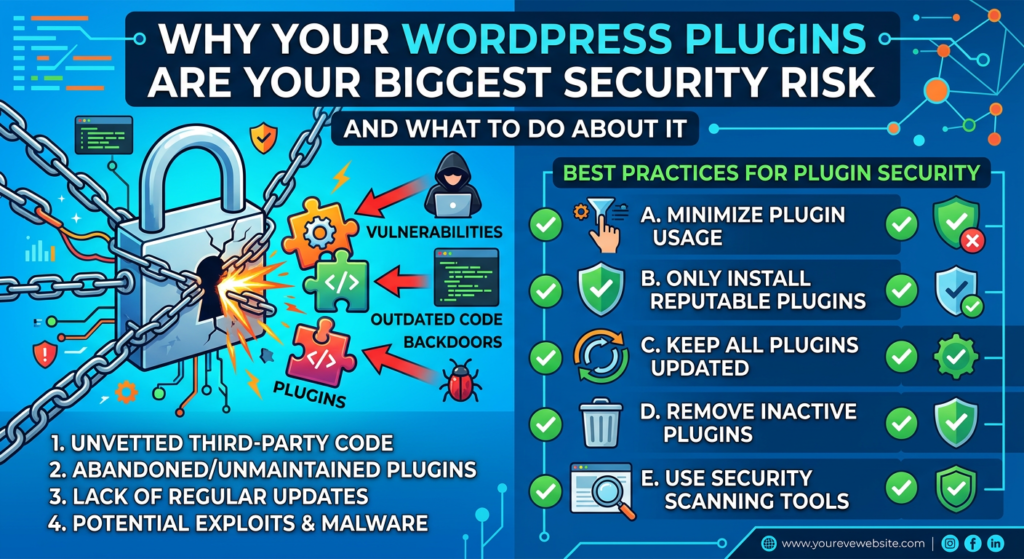
1. Outdated Plugins with Known Vulnerabilities
When a security vulnerability is discovered in a plugin, it’s typically published in public vulnerability databases — which means hackers know about it too. Any site still running the old version becomes an easy target. Automated bots continuously scan the internet for sites running vulnerable plugin versions and exploit them at scale.
This is the most common way WordPress sites get hacked: not through sophisticated targeted attacks, but through automated exploitation of known, published vulnerabilities in plugins you forgot to update.
2. Abandoned Plugins
Thousands of plugins in the WordPress repository haven’t been updated in years. Their developers have moved on, lost interest, or simply stopped maintaining them. These plugins receive no security patches — meaning any vulnerability discovered after the developer’s last update remains permanently open.
If you’re running a plugin that hasn’t been updated in over a year, consider it a security liability and look for an actively maintained alternative.
3. Nulled / Pirated Plugins
Nulled plugins are premium plugins distributed illegally for free. They’re widely available on shady download sites — and they’re one of the most reliable ways to get your WordPress site infected with malware.
Security researchers consistently find that nulled plugins are pre-loaded with backdoors, malware droppers, and spam injectors. The ‘free’ plugin costs you far more than the original license ever would have.
4. Plugins with Excessive Permissions
Some plugins request far more access than they actually need to function. A plugin that needs to display a widget shouldn’t require database write access or the ability to create admin users. Poorly scoped permissions mean that if the plugin is compromised, the damage is far greater than it needed to be.
Plugin Risk Level: A Quick Reference
Plugin Category | Risk Level | Why It’s Risky |
Abandoned / no updates | 🔴 Critical | Unpatched vulnerabilities, no security fixes |
Nulled / pirated plugins | 🔴 Critical | Commonly pre-loaded with backdoors & malware |
Poorly coded free plugins | 🟠 High | Often lack input validation & security best practices |
Popular plugins (unupdated) | 🟠 High | High-value targets; exploits published publicly |
Premium plugins (updated) | 🟡 Medium | Better coded, but still need regular updates |
Official CMS plugins (updated) | 🟢 Lower | Actively maintained, audited more frequently |
How to Audit Your WordPress Plugins Right Now
Take 20 minutes this week and do the following:
- Go to your WordPress dashboard and list every installed plugin — active and inactive
- Check the last update date for each one in the WordPress plugin repository
- Deactivate and delete any plugin you’re not actively using
- Research any plugin that hasn’t been updated in over 12 months — find an alternative
- Check whether any of your plugins have known vulnerabilities using a tool like WPScan or Patchstack
- Ensure every active plugin is running its latest version
Inactive plugins are just as dangerous as active ones if they’re still installed. Delete them — don’t just deactivate.
Beyond Auditing: Ongoing Plugin Security
A one-time audit is a start, but plugin security needs to be ongoing. Here’s your ongoing strategy:
- Enable automatic updates: Turn on automatic updates for plugins where you trust the developer. At minimum, update manually at least weekly.
- Monitor for vulnerabilities: Use a vulnerability monitoring tool that alerts you when a plugin you’re running has a newly discovered security flaw.
- Use a WAF as a safety net: A web application firewall can virtually patch known plugin vulnerabilities — blocking exploitation attempts even before you’ve applied the update.
- Scan for malware regularly: Continuous malware scanning catches infections from plugin vulnerabilities before they escalate.
Sucuri‘s platform addresses all of this: its WAF provides virtual patching for known WordPress plugin vulnerabilities, its malware scanner monitors your site files and database continuously, and its security team is available to clean up any infection — guaranteed — if something gets through.
🔌 Don’t let a forgotten plugin be the reason your site gets hacked. Protect your WordPress site with Sucuri today — WAF protection, malware scanning, and virtual patching for plugin vulnerabilities, all in one platform.
Your plugins are only as safe as the developer who maintains them. Your website’s security shouldn’t depend on someone else’s update schedule.